ZeroMQ - MISP Publish/Subscribe
MISP ZeroMQ
MISP includes a flexible publish-subscribe model to allow real-time integration of MISP activities (event publication, attribute creation or removal, sighting). The MISP ZeroMQ plugin operates at global level in MISP which means standard distribution rules don’t apply and every activity will be published within the ZeroMQ pub-sub channels.
MISP ZeroMQ functionality can be used for various models of integration or to extend MISP functionalities:
- real-time search of indicators into a SIEM
- automatic expansion
- dashboard activities
- logging mechanisms
- continuous indexing
- custom software or scripting
The following notification topic channels exist and can be included in the MISP ZeroMQ pub-sub:
misp_json- a full event serialisation, emitted when an event is publishedmisp_json_event- event created, updated or deletedmisp_json_object- object created or updatedmisp_json_object_reference- object reference created or deletedmisp_json_attribute- attribute created, updated or deletedmisp_json_tag- tag created, updated or attached/detachedmisp_json_sighting- sighting added to an attribute or an eventmisp_json_warninglist- warninglist created or updatedmisp_json_conversation- discussion (conversation) messagesmisp_json_workflow- workflow execution notificationsmisp_json_user- user login, creation or updatemisp_json_organisation- organisation creation or updatemisp_json_audit- audit-log entriesmisp_json_self- keep-alive messages sent every minute
Each channel maps to a matching Plugin.ZeroMQ_*_notifications_enable setting, so a site admin decides per channel which activity is published (see below). Every message carries an action field (for example add, edit, delete) describing what happened.
MISP ZeroMQ configuration
To enable MISP ZeroMQ, set Plugin.ZeroMQ_enable to true under Administration → Server Settings & Maintenance → Plugin settings (the Plugin tab).
The ZeroMQ server ships with MISP and runs from the MISP Python virtualenv. Its dependencies (pyzmq, redis) are installed with the rest of MISP’s Python packages, so on a standard install you do not need to install them by hand. If they are missing, install them into the MISP virtualenv rather than system-wide:
sudo -H -u www-data /var/www/MISP/venv/bin/pip install pyzmq redisIf you have problems and the plugin does not start, the logfile may be helpful.
sudo cat /var/www/MISP/app/tmp/logs/mispzmq.error.log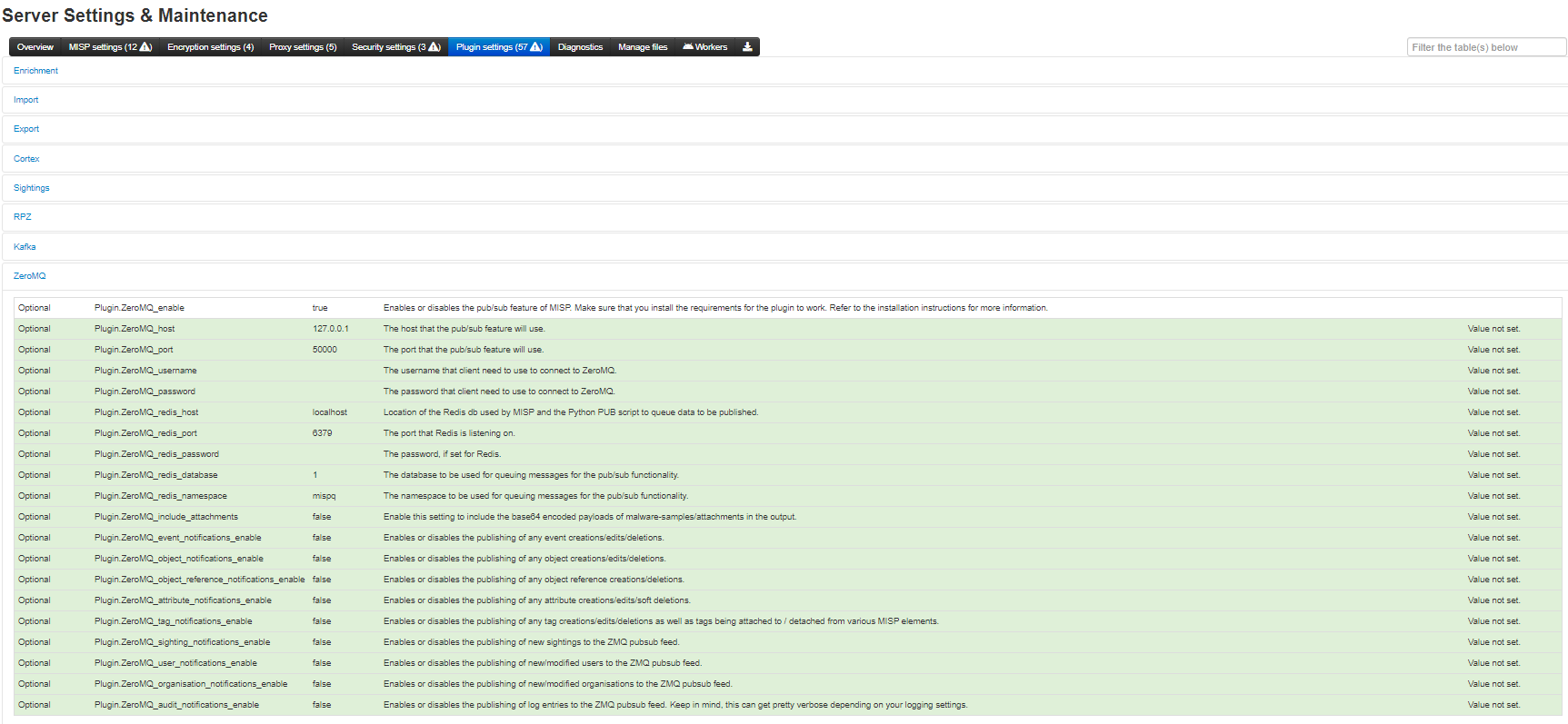
Each notification channel has its own Plugin.ZeroMQ_<type>_notifications_enable toggle (attribute, audit, event, object, object_reference, organisation, sighting, tag, user, warninglist), so the MISP site admin can decide exactly which types of messages are published. Related settings control the binding (ZeroMQ_host, ZeroMQ_port), optional authentication (ZeroMQ_username, ZeroMQ_password), the backing Redis (ZeroMQ_redis_host, ZeroMQ_redis_port, ZeroMQ_redis_database, ZeroMQ_redis_namespace, ZeroMQ_redis_password) and whether attachments are included (ZeroMQ_include_attachments).
By default, the ZMQ pub-sub channel is available to localhost only on TCP port 50000. The binding of the pub-sub channel can be updated in the configuration interface as shown above
MISP ZeroMQ debugging and testing
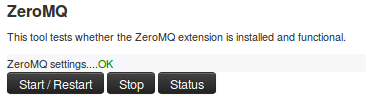
In the diagnostic section, ZeroMQ service can be started and stopped. There is a status check that can be run to give information about the number of events processed by the service.
Testing with sub.py tool
A simple command line tool is included with MISP to connect to the MISP ZeroMQ channel and get the notifications:
python3 sub.py --help
usage: sub.py [-h] [-s] [-p PORT] [-r HOST] [-o ONLY] [-t SLEEP]

Generic ZMQ client to gather events, attributes and sighting updates from a
MISP instance

optional arguments:
  -h, --help            show this help message and exit
  -s, --stats           print regular statistics on stderr
  -p PORT, --port PORT  set TCP port of the MISP ZMQ (default: 50000)
  -r HOST, --host HOST  set host of the MISP ZMQ (default: 127.0.0.1)
  -o ONLY, --only ONLY  set filter (misp_json, misp_json_event,
                        misp_json_attribute or misp_json_sighting) to limit the
                        output for a specific type; may be repeated (default: no
                        filter)
  -t SLEEP, --sleep SLEEP
                        sleep time (default: 0.1)
The sub.py will output the JSON objects for the subscribed topic, by default, all the topic channels are dumped:
misp@cpeb:/var/www/MISP/tools/misp-zmq$ python3 -u sub.py  | jq .
....
{
  "uptime": 50,
  "status": "And when you're dead I will be still alive."
}
{
  "uptime": 60,
  "status": "And believe me I am still alive."
}
{
  "uptime": 70,
  "status": "I'm doing science and I'm still alive."
}
{
  "uptime": 80,
  "status": "I feel FANTASTIC and I'm still alive."
}
{
  "uptime": 90,
  "status": "While you're dying I'll be still alive."
}
{
  "Sighting": {
    "uuid": "592d9588-fda0-490f-bf6e-4e56950d210f",
    "source": "",
    "type": "0",
    "date_sighting": 1496159624,
    "org_id": "2",
    "event_id": "8102",
    "attribute_id": "1044812"
  }
}
{
  "Attribute": {
    "id": "1044802",
    "value2": "",
    "value1": "1.2.3.4",
    "uuid": "592d8494-7120-4760-b5e2-4858950d210f",
    "batch_import": "0",
    "comment": "",
    "value": "1.2.3.4",
    "type": "ip-dst",
    "to_ids": 0,
    "timestamp": 1496155284,
    "distribution": "5",
    "sharing_group_id": 0,
    "deleted": "0",
    "disable_correlation": "0",
    "event_id": "8100",
    "category": "Network activity"
  }
}
....
Notification Schemas
Each notification channel uses a slightly different JSON schema. Consult this section to identify which MISP components exist in a channel:
misp_json - events published
When an event is published to ZMQ (which is different from being published in MISP) the ZMQ notification will contain the MISP event data along with all its component children. These components include: * A list of attributes * A list of objects, which contain their own lists of attributes * A list of related events - added when attributes in separate events correlate * Any galaxies that this event belongs to * A list of tags that apply to the event
Example:
{
    "Event": {
        "id": "625",
        "orgc_id": "2",
        "org_id": "1",
        "date": "2017-05-24",
        "threat_level_id": "3",
        "info": "M2M - Fwd: IMG_3428.pdf",
        "published": false,
        "uuid": "59259036-fcd0-4749-8a6c-4d88950d210f",
        "attribute_count": "7",
        "analysis": "1",
        "timestamp": "1505755565",
        "distribution": "3",
        "proposal_email_lock": false,
        "locked": false,
        "publish_timestamp": "1505416766",
        "sharing_group_id": "0",
        "disable_correlation": false,
        "Org": {"id": "1", "name": "MISP", "uuid": "56ef3277-1ad4-42f6-b90b-04e5c0a83832"},
        "Orgc": {"id": "2", "name": "CIRCL", "uuid": "55f6ea5e-2c60-40e5-964f-47a8950d210f"},
        "Attribute": [
            {
                "id": "157835",
                "type": "attachment",
                "category": "Artifacts dropped",
                "to_ids": false,
                "uuid": "59259037-1014-4669-96b1-46af950d210f",
                "event_id": "625",
                "distribution": "5",
                "timestamp": "1495633975",
                "comment": "IMG_3428.pdf",
                "sharing_group_id": "0",
                "deleted": false,
                "disable_correlation": false,
                "object_id": "0",
                "object_relation": null,
                "value": "tmpzuni0skf",
                "ShadowAttribute": []
            }
        ],
        "ShadowAttribute": [],
        "RelatedEvent": [],
        "Galaxy": [],
        "Object": [
            {
                "id": "1",
                "name": "http-request",
                "meta-category": "network",
                "description": "A single HTTP request header",
                "template_uuid": "b4a8d163-8110-4239-bfcf-e08f3a9fdf7b",
                "template_version": "1",
                "event_id": "625",
                "uuid": "59c0016c-0984-4779-9688-05b8c0a83832",
                "timestamp": "1505755500",
                "distribution": "5",
                "sharing_group_id": "0",
                "comment": "",
                "deleted": false,
                "ObjectReference": [],
                "Attribute": [
                    {
                        "id": "164371",
                        "type": "http-method",
                        "category": "Network activity",
                        "to_ids": false,
                        "uuid": "59c0016c-a744-440d-ad92-05b8c0a83832",
                        "event_id": "625",
                        "distribution": "5",
                        "timestamp": "1505760143",
                        "comment": "",
                        "sharing_group_id": "0",
                        "deleted": false,
                        "disable_correlation": false,
                        "object_id": "1",
                        "object_relation": "method",
                        "value": "POST",
                        "ShadowAttribute": []
                    },
                    {
                        "id": "164372",
                        "type": "uri",
                        "category": "Network activity",
                        "to_ids": true,
                        "uuid": "59c0016c-fac0-4055-9f3d-05b8c0a83832",
                        "event_id": "625",
                        "distribution": "5",
                        "timestamp": "1505755500",
                        "comment": "",
                        "sharing_group_id": "0",
                        "deleted": false,
                        "disable_correlation": false,
                        "object_id": "1",
                        "object_relation": "uri",
                        "value": "\/test.php",
                        "ShadowAttribute": []
                    }
                ]
            }
        ],
        "Tag": [{"id": "2", "name": "tlp:white", "colour": "#ffffff", "exportable": true, "hide_tag": false}]
    }
}
misp_json_attribute - attribute updated or created
The attributes appear to have the most diversity depending on the action applied to them.
When an attribute gets created, the attribute gets sent out via ZMQ. The parent event id is included in the attribute JSON, but there is no extra event metadata like there is when an attribute is deleted or modified.
Create Example:
{
    "Attribute": {
        "to_ids": "1",
        "timestamp": 1505235275,
        "distribution": "5",
        "deleted": "0",
        "disable_correlation": "0",
        "event_id": "625",
        "category": "Network activity",
        "type": "domain",
        "value": "microsoft.net",
        "comment": "",
        "batch_import": "0",
        "uuid": "59b8114b-1c80-4149-be3a-03e9c0a83832",
        "sharing_group_id": 0,
        "value1": "microsoft.net",
        "value2": "",
        "id": "164363"
    }
}
Edited attribute notifications send metadata about their parent events and information about the attribute’s sharing group, attribute-level tags, and sightings data. It’s important to note that only the new value of the edited attribute is sent along the ZMQ channel. In order to see the difference between the new and old values, you’d need to have a copy of the old attribute value stored somewhere. If you do, you can use the attribute’s uuid key (which never changes) to correlate the new and old values.
Edit Example:
// microsoft.net --> microsoft.com
{
    "Attribute": {
        "id": "164363",
        "event_id": "625",
        "category": "Network activity",
        "type": "domain",
        "value1": "microsoft.com",
        "value2": "",
        "to_ids": "1",
        "uuid": "59b8114b-1c80-4149-be3a-03e9c0a83832",
        "timestamp": 1505235283,
        "distribution": "5",
        "sharing_group_id": 0,
        "comment": "",
        "deleted": false,
        "disable_correlation": false,
        "value": "microsoft.com",
        "batch_import": "0"
    },
    "Event": {
        "id": "625",
        "org_id": "1",
        "date": "2017-05-24",
        "info": "M2M - Fwd: IMG_3428.pdf",
        "user_id": "1",
        "uuid": "59259036-fcd0-4749-8a6c-4d88950d210f",
        "published": false,
        "analysis": "1",
        "attribute_count": "5",
        "orgc_id": "2",
        "timestamp": "1505235275",
        "distribution": "3",
        "sharing_group_id": "0",
        "proposal_email_lock": false,
        "locked": false,
        "threat_level_id": "3",
        "publish_timestamp": "1505233367",
        "disable_correlation": false
    },
    "SharingGroup": {
        "id": null,
        "name": null,
        "releasability": null,
        "description": null,
        "uuid": null,
        "organisation_uuid": null,
        "org_id": null,
        "sync_user_id": null,
        "active": null,
        "created": null,
        "modified": null,
        "local": null,
        "roaming": null
    },
    "AttributeTag": [],
    "Sighting": []
},
When an attribute gets deleted, the deleted key gets set to 1, and the attribute’s event metadata gets sent alongside it.
Delete Example:
{
    "Attribute": {
        "id": "164362",
        "event_id": "625",
        "category": "Network activity",
        "type": "domain",
        "value1": "microsoft.com",
        "value2": "",
        "to_ids": true,
        "uuid": "59b81121-f4b4-4ed3-aa43-03eac0a83832",
        "timestamp": 1505235262,
        "distribution": "5",
        "sharing_group_id": 0,
        "comment": "",
        "deleted": 1,
        "disable_correlation": false,
        "value": "microsoft.net"
    },
    "Event": {
        "id": "625",
        "org_id": "1",
        "date": "2017-05-24",
        "info": "M2M - Fwd: IMG_3428.pdf",
        "user_id": "1",
        "uuid": "59259036-fcd0-4749-8a6c-4d88950d210f",
        "published": false,
        "analysis": "1",
        "attribute_count": "5",
        "orgc_id": "2",
        "timestamp": "1505235233",
        "distribution": "3",
        "sharing_group_id": "0",
        "proposal_email_lock": false,
        "locked": false,
        "threat_level_id": "3",
        "publish_timestamp": "1505233367",
        "disable_correlation": false
    }
}
misp_json_sighting - sighting added to an attribute or an event
The message sent for sightings is fairly simple, with the type of sighting (0 = Addition, 1 = False Positive), the date (in seconds-since-epoch format), the id of the attribute it applies to and the id of the attribute’s parent event.
Addition Example:
{
    "Sighting": {
        "type": "0",
        "attribute_id": "164373",
        "event_id": "625",
        "org_id": "1",
        "date_sighting": 1505767537,
        "source": "",
        "uuid": "59c03071-f480-4311-a710-03edc0a83832",
        "id": "1"
    }
}
False Positive Example:
{
    "Sighting": {
        "type": "1",
        "attribute_id": "164373",
        "event_id": "625",
        "org_id": "1",
        "date_sighting": 1505767543,
        "source": "",
        "uuid": "59c03077-d560-4a8b-b841-05b8c0a83832",
        "id": "2"
    }
}
misp_json_user - user updates or creation
An update is sent through ZMQ when users log in. There are actually two messages for this - both being fairly sparse. The current_login message contains who logged in and at what time (in seconds-since-epoch format) the login happened. The last_login message contains who just logged in, what time the previous login occurred (last_login) and the time the record was modified, which should be the same as current_login time.
Login Example:
{
    "User": {
        "id": "1",
        "last_login": "1000046766",
        "date_modified": 1000060160
    }
}
{
    "User": {
        "id": "1",
        "current_login": 1000060160,
        "date_modified": 1000060160
    }
}
When a user gets created, all of the information about the user (id, email, base64 encoded GnuPG key, role, etc.) gets sent to ZMQ. If this information is modified, the same JSON will be sent along the ZMQ channel, with updated values. For example, if the below user is disabled, the same JSON will be sent, but the disabled key will be set to "1"
User Creation and User Edit Example:
{
    "User": {
        "server_id": 0,
        "autoalert": "1",
        "invited_by": "1",
        "nids_sid": 5976699,
        "termsaccepted": 0,
        "role_id": "3",
        "change_pw": 1,
        "contactalert": "1",
        "disabled": "0",
        "current_login": "0",
        "last_login": "0",
        "force_logout": "0",
        "email": "user@testemail.com",
        "enable_password": "0",
        "org_id": "1",
        "authkey": "__<redacted>__",
        "gpgkey": "__<redacted>__",
        "notify": "1",
        "date_created": 1000000000,
        "date_modified": 1000000000,
        "newsread": 0,
        "certif_public": "",
        "id": "4"
    }
}
misp_json_organisation - organisation updates or creation
Org notifications are sent when Orgs are updated and created, but not when they are deleted. They are generally the same, with the additional fields created_by and date_created being present when an Org is created.
Creation Example:
{
    "Organisation": {
        "created_by": "1",
        "local": "1",
        "name": "test",
        "uuid": "59c0367d-fe8c-42a4-9db2-03ecc0a83832",
        "description": "Test",
        "nationality": "Not specified",
        "sector": "",
        "type": "",
        "contacts": "",
        "logo": {
            "name": "",
            "type": "",
            "tmp_name": "",
            "error": 4,
            "size": 0
        },
        "date_created": "2017-09-18 23:11:28",
        "date_modified": "2017-09-18 23:11:28",
        "id": "10"
    }
}
Edit Example:
{
    "Organisation": {
        "local": "1",
        "name": "test",
        "uuid": "59c0367d-fe8c-42a4-9db2-03ecc0a83832",
        "description": "Alternate Test",
        "nationality": "Not specified",
        "sector": "",
        "type": "",
        "contacts": "",
        "logo": {
            "name": "",
            "type": "",
            "tmp_name": "",
            "error": 4,
            "size": 0
        },
        "id": "10",
        "date_modified": "2017-09-18 23:11:37"
    }
}
misp_json_self - keep-alive messages sent every minute
Only really useful to ensure the ZMQ server is running. And for a bit of humor
{
    "status": "I'm doing science and I'm still alive.",
    "uptime": 9170
}
Tips for Building a Subscriber
misp_json_attributenotifications are sent when attributes are created, deleted, and edited- Check the
deletedkey to identify if an attribute has been created or deleted - If an attribute has been edited, the new value will be sent out via ZMQ, but the
uuidkey will remain the same. Use this to determine if an attribute has existed before or not
- Check the
- Some compound attribute types have component types that don’t exist outside of them
- For example, MISP doesn’t have a single
ipattribute type except in thedomain|iptype - If you’re going to split up and resubmit these attributes, you may have to modify these component types so MISP will recognize them (e.g. domain|ip -> domain, ip-dst)
- For example, MISP doesn’t have a single