Warning Lists
MISP warning lists contain well-known indicators that may correspond to false positives, errors, or mistakes. There is also a Python module for working with warning lists in a Pythonic way: PyMISPWarningLists. MISP Warning Lists GitHub Repository
Warning Lists and False Positives
False positives are a common issue in threat intelligence sharing. They are often contextual: - What counts as a false positive may differ from one sharing community to another. - Organizations may also have their own view of what should be treated as a false positive.
Usage
By default, MISP triggers warning list hits only when the attribute IDS flag is set. You can change this behavior by setting the MISP.warning_for_all configuration parameter to true.
When an attribute matches a warninglist entry, an info/warning box is displayed at the event and attribute level, as can be seen in the screenshot below. 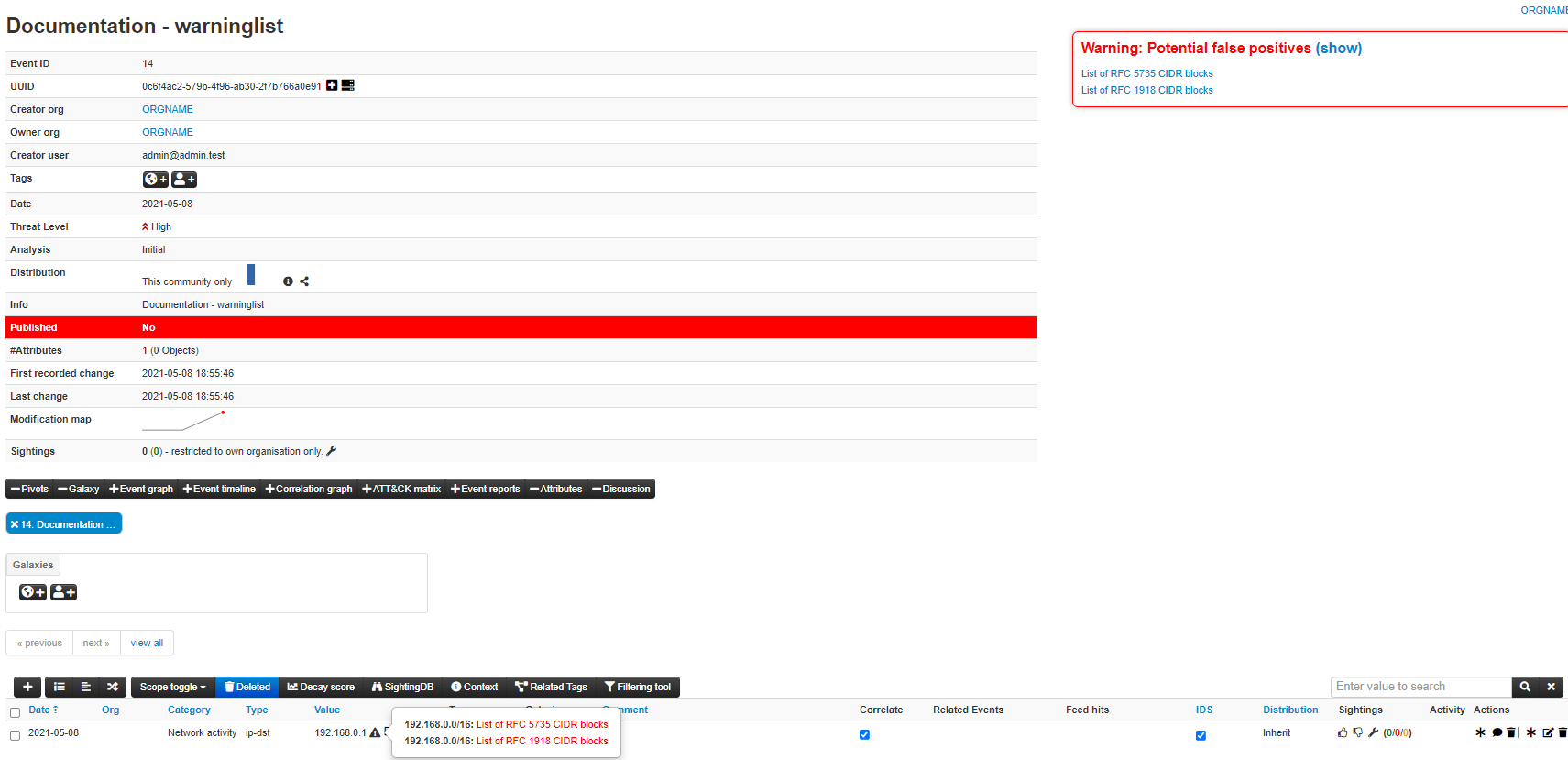
Individual warning lists can be enabled or disabled at the instance level from the warning lists index page. Examples of default warning lists include known public DNS resolvers, multicast IP addresses, hashes for empty values, RFC1918 ranges, TLDs, and known Google domains. 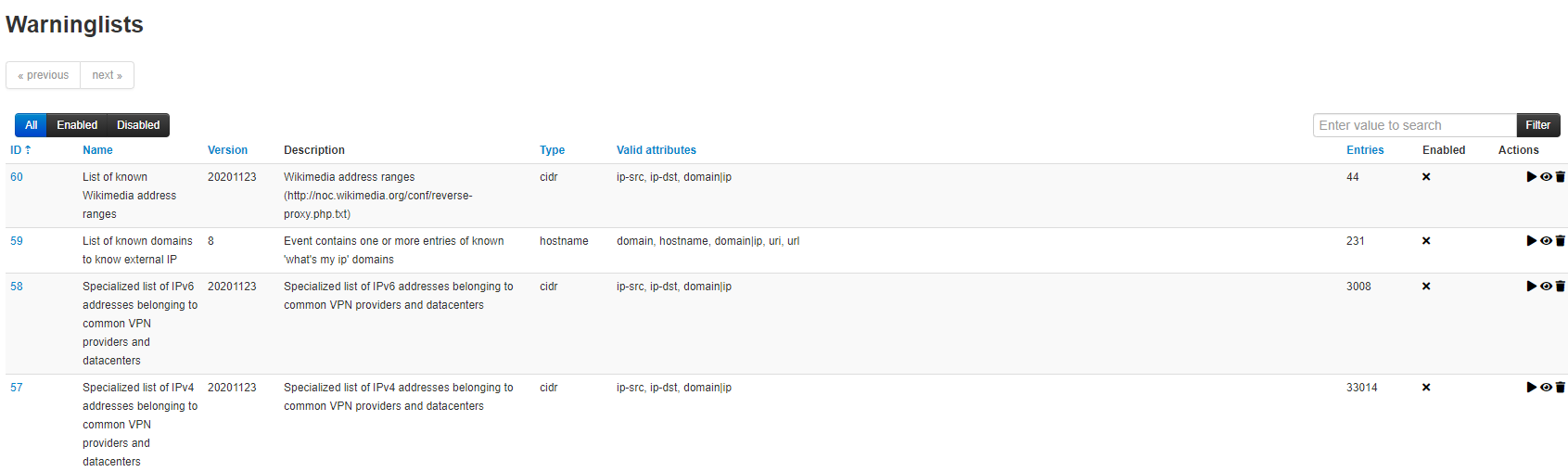
Warning lists can be extended locally in JSON or contributed through pull requests to https://github.com/MISP/misp-warninglists. They can also be used for critical infrastructure, core infrastructure, or personally identifiable information.
Warninglists and data export
The enforceWarninglist parameter of MISP restSearch can be used to exclude attributes that have a warninglist hit from the export. For more information on the MISP API, please refer to the Automation and MISP API chapter.
Check individual values for warning list hits
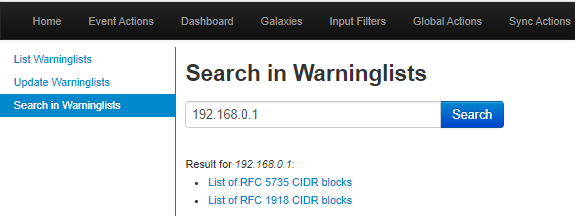
It is also possible to do a lookup for a specific value in the warninglists. This functionality is accessible by using the top menu “Input Filters” > “List Warninglists” and then using the link in the left side menu bar (or by browsing directly to [misp_base_url]/warninglists/checkValue). Only enabled warninglists will be searched.
Updating warninglists
An update of the warninglists can be triggered via the GUI using the “Update Warninglists” button in the side menu bar when viewing any of the relevant warninglists pages, for example the index page.
Alternatively, it is also possible to trigger an update using a CLI command. ~ MISP/app/Console/cake Admin updateWarningLists ~
If you are updating an existing warning list, make sure you increment the version number before triggering the update in MISP. You can also contribute to the existing warning lists by forking the MISP Warning Lists GitHub Repository, making your changes, and then opening a pull request.
How matching works: types and categories
Each warninglist declares a type that controls how its entries are matched against attribute values:
| Type | Matches when the value… |
|---|---|
string |
equals an entry exactly |
substring |
contains an entry as a substring |
hostname |
is (or is a subdomain of) an entry hostname |
cidr |
is an IP address inside an entry CIDR range |
regex |
matches an entry regular expression |
Each list also has a category — either false_positive (values likely to be false positives, such as RFC1918 ranges or public DNS resolvers) or known (well-known values, such as your own infrastructure) — which is shown alongside the hit so you understand why a value was flagged.
Managing warninglists from the GUI
As well as the file-based method below, MISP lets site administrators create and manage warninglists directly in the web interface from Input Filters → List Warninglists:
- New Warninglist — create a list by giving it a name and description, choosing its type and category, and pasting its entries (one per line). This is the quickest way to add, for example, a list of your organisation’s own domains or IP ranges.
- Edit — update an existing GUI-created list’s metadata or entries.
- Delete — remove a list you no longer need (individually or via the bulk selection).
- Enable / disable in bulk — the index supports mass enable/disable across selected lists.
Lists that ship with MISP (from the misp-warninglists repository) are maintained upstream and refreshed by the update mechanism; use the GUI editor mainly for your own local lists so your changes are not overwritten on the next update.
Creating a custom warninglist on disk
You can also add a warninglist as a file on the server:
- Create a new directory for your warninglist in /var/www/MISP/app/files/warninglists/lists.
- Add a file called list.json to the newly created directory and add the content you want. You can use any of the existing warning lists in https://github.com/MISP/misp-warninglists as reference.
- Trigger an update of the warning lists on the instance to load in your new warning list.
Example use cases include a list of domain names owned by your organization or a list of employee email addresses.