Updating Python Dependencies
MISP requires several Python libraries for its full feature set to work correctly.
These features include the import and export tools, binary extraction from attachments, and PyMISP.
Installation
MISP uses virtual environments to make Python installation and maintenance easier.
If you use the installation scripts to set up MISP on your machine, or start from the automatically generated virtual machine, you already have the latest required Python libraries installed in a virtual environment.
If you are using an older MISP version, you may want to create the virtual environment manually.
Set Up the Virtual Environment
# Create a python3 virtualenv
sudo -H -u www-data virtualenv -p python3 /var/www/MISP/venv

# Make pip happy
sudo mkdir /var/www/.cache
sudo chown www-data:www-data /var/www/.cache
If you already have a venv directory, you can skip this step.
Updating MISP and its dependencies
Keeping MISP as up to date as possible is the safest way to avoid most potential issues.
You can do this either from the Update button in the diagnostic tool in the MISP UI or from the command line.
Updating MISP core
To update MISP dependencies, first pull the latest MISP version so you also get the latest submodule references.
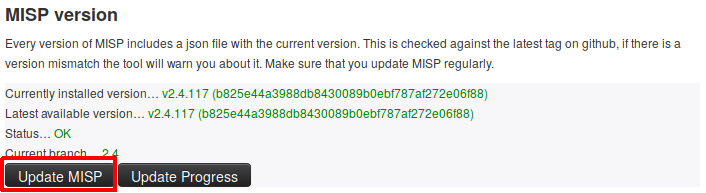
OR bash sudo -H -u www-data git pull origin 2.5
Once you have the latest MISP update, you can start updating the Python libraries.
Updating the python dependencies
MISP includes several submodules that support additional functionality, so it is important to keep those dependencies up to date. bash sudo -H -u www-data git submodule update –init –recursive
Updating python dependencies
You can check the status of all Python libraries required by MISP by using the diagnostic tool again.
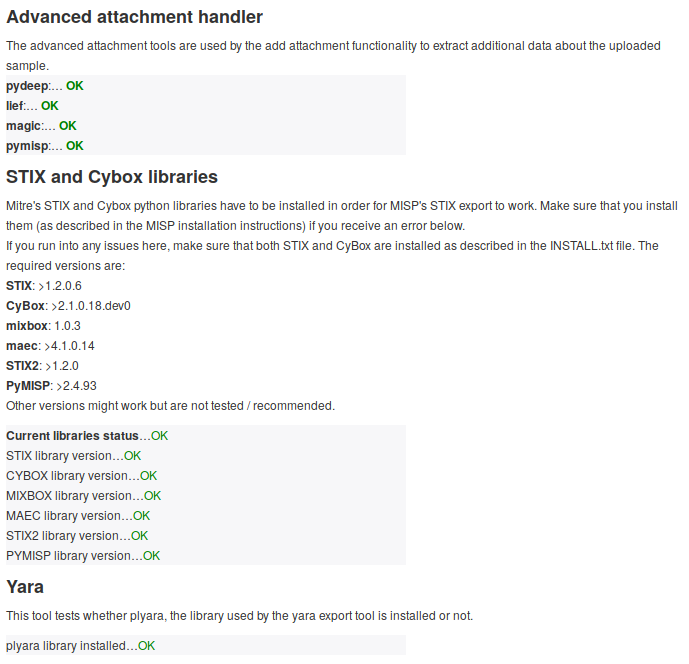
If something is wrong, updating the corresponding library should resolve the diagnostic warning.
The simplest and recommended way is to install the pinned set from MISP’s top-level requirements.txt, which covers PyMISP, misp-stix, the attachment handlers and the other libraries in one go:
sudo -H -u www-data /var/www/MISP/venv/bin/pip install -U -r /var/www/MISP/requirements.txtIf you prefer to update libraries individually:
# Update PyMISP
cd /var/www/MISP/PyMISP
sudo -H -u www-data /var/www/MISP/venv/bin/pip install -U .

# Advanced attachment handling
sudo -H -u www-data /var/www/MISP/venv/bin/pip install -U lief python-magic
# pydeep2 - WARNING: requires libfuzzy-dev
sudo -H -u www-data /var/www/MISP/venv/bin/pip install -U pydeep2

# STIX 1 and 2 conversion is provided by a single library, misp-stix
sudo -H -u www-data /var/www/MISP/venv/bin/pip install -U misp-stix

# Yara
sudo -H -u www-data /var/www/MISP/venv/bin/pip install -U plyaraThe old per-package STIX 1 stack (python-stix, python-cybox, python-maec, mixbox) is legacy. MISP 2.5 uses misp-stix (misp_stix_converter) for both STIX 1 and STIX 2 conversion, and it is included in requirements.txt.
If you want to use or update the ZeroMQ functionality, the pyzmq library is also part of requirements.txt; to update it on its own:
sudo -H -u www-data /var/www/MISP/venv/bin/pip install -U pyzmqUpdating MISP modules
Another set of dependencies you may want to update are MISP modules.
MISP modules have their own dependencies that need to be up-to-date as well as the modules scripts themselves.
Note that the following instructions consider your MISP modules are installed in the default path where we install them on our virtual machine or following the install script. Please change the path accordingly if needed.
# Change here the path if needed
cd /usr/local/src/misp-modules
# Update misp-modules requirements
sudo -H -u www-data /var/www/MISP/venv/bin/pip install -U -r REQUIREMENTS
# Update misp-modules scripts
sudo -H -u www-data /var/www/MISP/venv/bin/pip install -U .
You will then need to restart the modules, please refer to the documentation.